
Google Business Profile “Review Not Found” Error: Why Reviews Aren’t Showing and What Businesses Should Do
If you manage a Google Business Profile and recently noticed “Review Not Found” when trying to view or sort reviews, you may be wondering whether your reviews have been deleted.
You are not necessarily dealing with a permanently missing review.
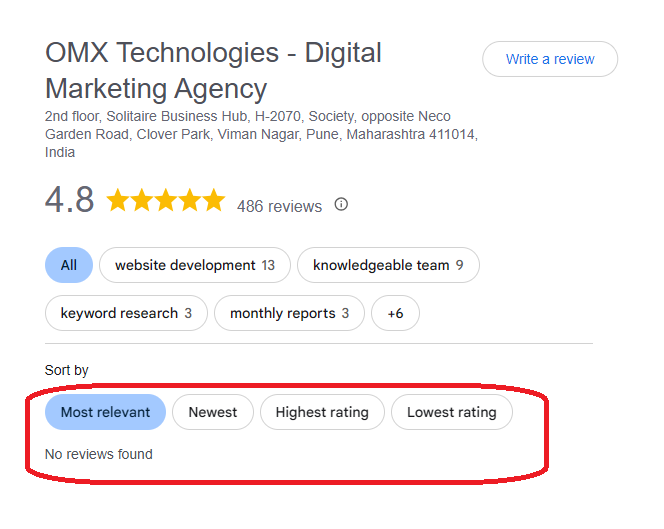
Some businesses and users have reported situations where a Business Profile continues to display its overall review count, while the review interface does not properly load additional reviews or displays “Review Not Found” after a sorting or filtering action.
This can be particularly confusing when the profile still shows its rating and review count.
Google’s official documentation confirms that reviews can sometimes be delayed or missing because they are undergoing checks, were removed for policy reasons, or because of situations such as a recent Business Profile merge. However, Google has not officially confirmed the specific current “Review Not Found” review-filter behavior as a platform-wide bug.
So, if you are searching for “Google Business Profile Review Not Found,” “Google reviews not showing,” or “why Google reviews are not showing,” the key is to determine whether you are seeing a display problem or whether specific reviews have actually disappeared.
What Does “Review Not Found” Mean on Google Business Profile?
The “Review Not Found” message generally means that Google is currently unable to display the requested review or review view.
The message itself does not prove that a review has been permanently deleted.
A typical situation may look like this:
- The Business Profile displays its normal review count.
- Some reviews are visible in the profile.
- The user selects “See all reviews” or another review-view option.
- Google displays sorting or filtering options.
- After selecting an option, the interface displays “Review Not Found.”
This is different from a situation where the Business Profile’s total review count has actually decreased.
For example:
- Scenario A: A profile previously had 486 reviews and still displays 486, but the review list produces “Review Not Found.”
- Scenario B: A profile had 486 reviews and now displays 450, with specific reviews no longer visible.
These situations should not automatically be treated as the same problem.
Are Multiple Businesses Facing the Google Review Not Found Issue?
This is an important part of understanding the current issue.
Google Business Profile Community discussions from 2026 contain multiple reports of businesses experiencing missing or disappearing reviews, including reports involving review counts changing and reviews not appearing as expected. These community reports demonstrate that businesses have been reporting review-related problems, but they do not establish that every “Review Not Found” message has one common technical cause.
This distinction matters.
If the same review-interface behavior appears across multiple unrelated Business Profiles, that observation can be consistent with a broader Google-side interface or service problem.
However, it should still be described as an observed behavior or reported issue, rather than stating that Google has officially confirmed a bug.
What businesses should look for
If several businesses are reporting the same behavior, compare:
- Whether the overall review count remains unchanged
- Whether existing reviews are still visible
- Whether the problem occurs in Google Search
- Whether the problem occurs in Google Maps
- Whether sorting/filtering triggers the error
- Whether new reviews are appearing
- Whether the issue occurs on different browsers and devices
This helps distinguish a possible interface issue from an individual review-removal problem.
Is “Review Not Found” a Google Business Profile Glitch?
At present, there is an important distinction between reported behavior and official confirmation.
Google’s official documentation explains several reasons why reviews may be missing or delayed. Reviews may be undergoing Google’s review checks, may have been removed for policy violations, or may take time to appear after Business Profiles are merged. Google also notes that, in certain situations, user-generated content including reviews may be temporarily disabled for particular profiles or business categories.
However, Google’s current official documentation does not identify the specific “Review Not Found” sorting/filter behavior described in this article as a confirmed platform-wide bug.
Therefore, the safest conclusion is:
“Review Not Found” may indicate a review-display or loading problem, but the message alone does not establish that Google has deleted the review or that a platform-wide bug has been officially confirmed.
That distinction is particularly important for businesses and SEO professionals reporting the issue to clients.
Why Can Google Still Show the Review Count?
One of the most confusing aspects of this issue is that the review count may remain visible even when individual reviews cannot be displayed properly.
A Google Business Profile contains several review-related components, including:
- Overall review count
- Overall rating
- Individual review content
- Review sorting
- Review filtering
- Review responses
- Review management tools
A problem affecting the review-display interface does not necessarily mean that the underlying review count has immediately changed.
Therefore, seeing the review count while receiving “Review Not Found” does not automatically mean that all reviews have been deleted.
“Review Not Found” Does Not Always Mean a Review Was Deleted
1. Review processing delays
Google checks reviews to ensure that they comply with its policies. This checking process can sometimes take several days, delaying a review’s appearance.2. Policy violations
Google may remove reviews that violate its policies, including spam or inappropriate content. Reviews removed for policy violations are not restored.3. Business Profile mergers
If two Business Profiles have recently been merged, Google says reviews from both profiles may take time to appear across Search and Maps.4. Review restrictions
Google may temporarily restrict or hide user-generated content in certain situations involving suspicious review activity or policy concerns.5. Interface or loading problems
If the review count remains unchanged and the same review interface behavior occurs across unrelated Business Profiles, a display or service-side issue may also need to be considered. This last possibility is important, but should not be presented as an officially confirmed explanation unless Google confirms it.Why Are Google Reviews Not Showing?
only one cause.
Google’s official guidance indicates that reviews may be delayed or missing because they are being checked, removed for policy violations, affected by a Business Profile merge, or restricted in certain circumstances.
There is also a difference between:
- A new review that has not appeared yet
and
- An existing review that previously appeared but can no longer be found
and
- The entire review interface failing to display reviews correctly
Each situation requires a different diagnosis.
How to Check Whether Your Google Reviews Are Actually Missing
1. Check the current review count
Compare the current review count with a previous screenshot, report, or tracking record. For example: Previous: 486 reviews Current: 486 reviews If the count remains unchanged but the review interface displays “Review Not Found,” this is different from: Previous: 486 reviews Current: 450 reviews A genuine decrease in the review count warrants a different investigation.2. Check Google Search and Google Maps
Check the Business Profile through both:- Google Search
- Google Maps
3. Test different devices and browsers
Try:- Desktop browser
- Mobile browser
- Google Maps app
- Another browser
- Incognito/private browsing
4. Test the sorting options
If the problem specifically appears after selecting a sorting or filtering option, record exactly what happens. For example: All reviews → Newest → Review Not Found or All reviews → Highest rating → Review Not Found This information can be useful when documenting the issue.5. Check individual review links
If you have previously saved URLs or screenshots of particular reviews, try opening those reviews directly. This can help determine whether:- One specific review is unavailable
- Several reviews are unavailable
- The general review interface is failing
What Should Businesses Do If Google Reviews Are Not Showing?
If the review count is intact and existing reviews remain visible, avoid making unnecessary changes to the Business Profile simply because the review interface displays “Review Not Found.”
Instead, document and monitor the issue.
Continue monitoring new reviews
Check whether new customer reviews are being published normally.
Take screenshots
Capture:
- Review count
- Overall rating
- Visible reviews
- “Review Not Found” message
- Sorting/filter options
- Google Search result
- Google Maps result
- Date and time
Record the affected reviews
If particular reviews are missing, record:
- Reviewer name
- Approximate review date
- Review content, if available
- Previous screenshot
- Review URL, if available
Do not make unrelated profile changes
Changing your:
- Business name
- Primary category
- Address
- Ownership
- Website
- Business description
will not diagnose a review-display problem.
Unnecessary profile changes can introduce other complications, so the review issue should be investigated independently.
What If Your Google Reviews Have Actually Disappeared?
If your review count has genuinely decreased or specific legitimate reviews have disappeared, investigate it as a missing-review issue, rather than assuming it is only a display glitch.
Google recommends contacting Business Profile support for missing-review situations and providing information such as the Business Profile ID, screenshots, the number of missing reviews, whether new reviews are appearing, the timeframe involved, reviewer names, and related case information.
Google also states that its automated systems can mistakenly remove legitimate reviews in some circumstances and advises contacting support when this happens.
Before contacting support, review Google’s review policies as well. Reviews can be removed when they violate Google’s content policies, including rules relating to spam, incentives, fake engagement, and rating manipulation.
Can “Review Not Found” Affect Local SEO Rankings?
There is currently no official Google statement establishing that the specific “Review Not Found” interface message directly causes a local ranking decline.
Therefore, businesses should not assume:
Review Not Found → Local ranking drop
Instead, monitor measurable Business Profile performance.
Useful metrics include:
- Search visibility
- Website visits
- Calls
- Direction requests
- Customer enquiries
- Review count
- Average rating
- Google Business Profile interactions
If visibility or conversions change at the same time as the review issue, investigate the broader performance picture rather than attributing the change automatically to the review message.
Why Businesses Should Not Assume Every Missing Review Is a Bug
Mistake 1: Assuming every missing review was deleted
Google explicitly says reviews can be delayed for several reasons, including review checks and Business Profile merges.Mistake 2: Assuming every missing review is a technical glitch
Google also confirms that reviews can be removed when they violate its policies. The correct approach is to identify the actual behavior first.Frequently Asked Questions
What does “Review Not Found” mean on Google Business Profile?
“Review Not Found” means Google is currently unable to display the requested review or review view. The message by itself does not prove that the review has been permanently deleted.Why can I see the review count but not the reviews?
The Business Profile’s review count and individual review-display interface are different parts of the Google experience. A problem affecting review loading, filtering, or display can occur while the overall count remains visible.Why are my Google reviews not showing?
Google says reviews can be delayed while they are checked, removed for policy violations, affected by Business Profile merges, or restricted in certain circumstances.Is Google removing all Business Profile reviews?
No. Google has documented specific circumstances in which reviews may be delayed, restricted, or removed, but the “Review Not Found” message alone does not establish that Google is removing all Business Profile reviews.Is “Review Not Found” a Google Business Profile bug?
Google has not officially confirmed the specific current review-filter behavior as a platform-wide bug. Reports from multiple users can indicate a broader issue, but user reports should not be treated as official confirmation of the technical cause.Are multiple businesses facing Google review problems?
Google Business Profile Community contains 2026 reports from businesses describing missing or changing reviews. These reports show that review-related problems are being discussed by multiple businesses, although they do not prove that every case has the same cause.Should I contact Google if I see “Review Not Found”?
If your review count has actually decreased, specific legitimate reviews have disappeared, or new reviews are not appearing after an appropriate processing period, contacting Google Business Profile support is reasonable. Google has a specific troubleshooting process for missing reviews.Can this issue affect local SEO rankings?
There is currently no official evidence establishing that this specific interface message directly causes a ranking decline. Businesses should monitor actual Search, Maps, and Business Profile performance instead of assuming a ranking impact from the message alone.Final Takeaway
The “Review Not Found” message on Google Business Profile can be confusing, particularly when the overall review count is still visible. The most important distinction is between a review-display problem and a genuinely missing review. Google officially acknowledges that reviews can sometimes be delayed, removed for policy reasons, affected by Business Profile mergers, or restricted in certain circumstances. At the same time, Google has not officially confirmed the specific current review-filter “Review Not Found” behavior as a platform-wide bug. For businesses experiencing the issue, the practical approach is to:- Check whether the overall review count has changed.
- Compare Google Search and Google Maps.
- Test different browsers and devices.
- Check whether sorting/filtering triggers the message.
- Verify individual reviews where possible.
- Monitor whether new reviews are being published.
- Document the issue with screenshots and dates.
- Contact Google if reviews have genuinely disappeared or remain missing.
In short:
If your Google Business Profile still shows the correct review count but the review interface displays “Review Not Found,” do not immediately assume that your reviews have been permanently deleted. First determine whether the problem is with the individual review or with Google’s review-display interface.